
Browse docs
Medical Wearables
Medical wearables turn completed treatments into visible equipment on the patient. Medics apply the configured item through the diagnosis and treatment interface, complete the matching minigame, and the server synchronizes the resulting prop to nearby players.
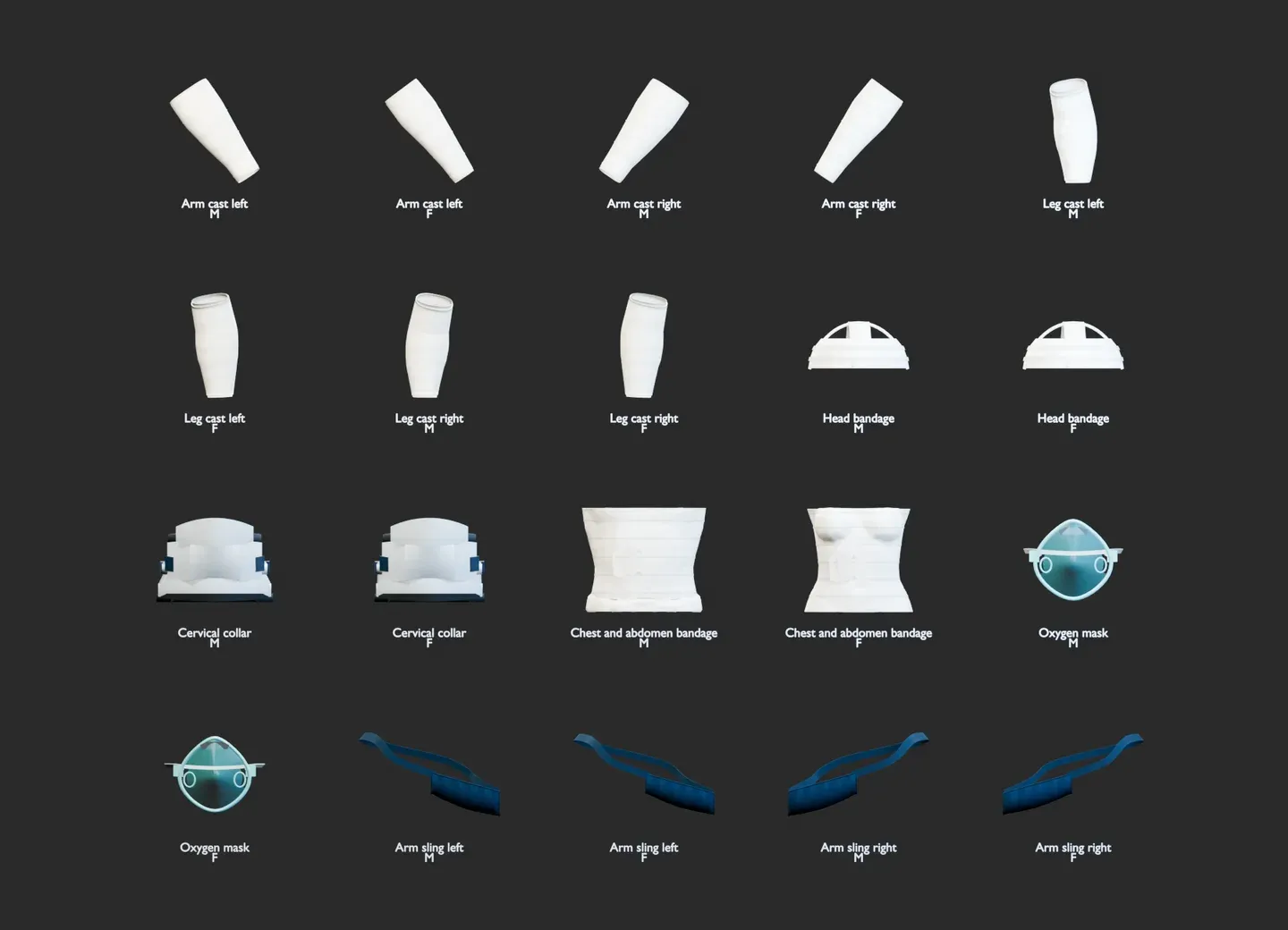
Technical renders of the included streamed props. Their final appearance depends on the patient's clothing and ped model.
mp_m_freemode_01 and mp_f_freemode_01 models. They are
streamed props, not clothing components, so applying one does not replace the patient's outfit.
Custom peds are not supported by the supplied model variants, and very bulky custom clothing can
clip through rigid props.Supported Equipment
| Equipment | Variants | Default item | Persistent | Special behavior |
|---|---|---|---|---|
| Arm cast | Left and right | cast_bandage | Yes | Can disable weapons and melee attacks |
| Leg cast | Left and right | cast_bandage | Yes | Can force an injured walk, reduce movement speed, and disable sprinting or jumping |
| Arm sling / splint | Left and right | splint | No | Uses a matching sling pose; only one side can be active at a time |
| Head bandage | One head variant | head_bandage | No | Visible treatment prop |
| Neck brace | One neck variant | neck_brace | Yes | Restored with the saved patient profile |
| Torso bandage | One torso variant | torso_bandage | No | Visible treatment prop |
| Oxygen mask | One face variant | oxygen_mask | No | Uses the configured ventilation minigame by default |
Every wearable has separate male and female streamed models. Multiple compatible props can be visible at the same time.
Treatment Flow
- A medic diagnoses a nearby patient and opens the treatment interface.
- The medic selects the wearable and, for a cast, chooses a configured duration.
- The configured treatment minigame runs when that minigame is enabled.
- The server checks the medic, patient, active diagnosis, distance, item, wearable type, and chosen duration again before committing the treatment.
- On success, one application item is consumed and the wearable is synchronized to players who can see the patient.
When Config.MedicalWearables.autoFromFractures is enabled, applying the matching cast or sling also
marks eligible arm, leg, hand, or foot fractures as treated and applies the normal fracture pain
relief. A medic can still apply a wearable deliberately when no matching fracture exists.
Persistence, Duration, and Removal
Arm casts, leg casts, and neck braces are stored in the patient's existing medical profile when
Config.MedicalWearables.persistence is enabled. They survive reconnects, resource or server
restarts, and the normal revive cleanup. Expired timed casts are removed during profile restoration
and by the configured online expiry check.
Only casts support a selectable duration:
- A positive value must match a configured duration option or the positive default duration.
0means until removed and is only offered whenallowUntilRemovedis enabled.- When an unlimited duration is disabled and the default is
0, the first positive configured duration becomes the fallback.
The treatment UI can remove active arm and leg casts when removal is enabled. The medic must carry
the configured cast_saw, but the saw is a reusable tool and is not consumed. Other wearable types
are not part of the medic cast-removal action.
Patient HUD
The patient medical-aid HUD is enabled by default. It lists the patient's active wearable props, shows the remaining time for timed aids, and labels unlimited aids as active until removed. The HUD uses synchronized server timestamps, so it does not treat the player's local clock as the medical record.
Set Config.MedicalWearables.patientHud.enabled = false to hide the HUD without disabling wearable
props or their restrictions. position accepts top-center, top-right, top-left, center,
center-right, center-left, bottom-center, bottom-left, or bottom-right.
For administrative cleanup, use:
/removemedicalprop <playerId> [propType|all]
For example, /removemedicalprop 42 neck_brace removes one prop and
/removemedicalprop 42 all clears every active medical prop. Permission groups are configured in
Config.CommandPermissions.removemedicalprop; see Commands.
Required Items and Assets
Register all seven current default item names in the active framework or inventory:
| Item | Purpose | Consumed |
|---|---|---|
cast_bandage | Apply an arm or leg cast | Yes |
splint | Apply a left or right arm sling | Yes |
head_bandage | Apply the head bandage | Yes |
neck_brace | Apply the neck brace | Yes |
torso_bandage | Apply the torso bandage | Yes |
oxygen_mask | Apply the oxygen mask | Yes |
cast_saw | Remove an active cast | No |
Ready-to-copy definitions for every documented inventory are available under
Inventory Items. Copy the matching PNG files from
sky_ambulancejob/config/inventory/ into the inventory's image directory.
The resource does not add these items to a job shop automatically. Add the six consumables and the
reusable saw to each intended Config.Jobs[*].shop or storage configuration with prices and access
rules that fit your server.
stream/ directory together with config/medical_props.lua. Items
without the streamed YDR/YTYP/YCD assets can complete a treatment but cannot display the intended
model. Mixing model files or configuration from different releases can also select the wrong
variant.Item Names after Updating
Current defaults use English item identifiers. Earlier 2.34.x configurations used the identifiers below:
| Earlier default | Current default |
|---|---|
gipsverband | cast_bandage |
schiene | splint |
kopfverband | head_bandage |
halskrause | neck_brace |
torsobandage | torso_bandage |
sauerstoffmaske | oxygen_mask |
gipssaege | cast_saw |
The values in the active Config.MedicalWearables block are authoritative. When migrating, update
the configuration, inventory records, inventory images, and any shop or storage rows together. Do
not rename only the image or only the inventory entry.
Configuration
The current default block is:
Config.MedicalWearables = {
    enabled = true,
    persistence = true,
    autoFromFractures = true,
    removal = true,

    patientHud = {
        enabled = true,
        position = "top-center"
    },

    allowUntilRemoved = true,
    durationOptionsMinutes = { 30, 60, 120, 240, 480, 1440, 4320, 10080 },
    defaultDurationMinutes = 0,
    expiryCheckSeconds = 60,

    casts = {
        enabled = true,
        item = "cast_bandage",
        minigame = "bandage_wrap"
    },
    splints = {
        enabled = true,
        item = "splint",
        minigame = "bandage_wrap"
    },
    headBandage = {
        enabled = true,
        item = "head_bandage",
        minigame = "bandage_wrap"
    },
    neckBrace = {
        enabled = true,
        item = "neck_brace",
        minigame = "bandage_wrap"
    },
    torsoBandage = {
        enabled = true,
        item = "torso_bandage",
        minigame = "bandage_wrap"
    },
    oxygenMask = {
        enabled = true,
        item = "oxygen_mask",
        minigame = "bag_valve_mask"
    },
    removalTreatment = {
        enabled = true,
        item = "cast_saw",
        minigame = "bullet_extraction"
    },

    restrictions = {
        legCasts = {
            enabled = true,
            forceInjuredWalk = true,
            moveRate = 0.75,
            disableSprint = true,
            disableJump = true
        },
        armCasts = {
            enabled = true,
            disableWeapons = true,
            disableMelee = true
        }
    }
}
Config.UseJobConfigurator = true, edit these values under Treatment → Medical Wearables
in /jobconfig. Saved Job Configurator values override the Lua defaults. When the Job Configurator
is disabled, edit Config.MedicalWearables directly and restart the resource.Troubleshooting
- Treatment is available but the prop is invisible: install the complete current stream folder,
confirm
config/medical_props.lua, and verify that the patient uses a supported freemode model. - The medic sees a missing-item error: compare the configured item name with the exact inventory identifier and make sure the item is in the medic's inventory, not only in a shop definition.
- A cast does not return after reconnecting: enable persistence, confirm the patient profile is being saved, and check whether the cast's configured duration already expired.
- A cast does not restrict movement or combat: enable the matching
restrictions.legCastsorrestrictions.armCastsblock. These restrictions apply to casts, not to sling props. - The wearable is visible but the patient HUD is missing: enable both
Config.MedicalWearables.enabledandpatientHud.enabled, then verify the saved Treatment → Medical Wearables → Patient HUD values in/jobconfig; saved values overrideconfig.lua. - The HUD covers another interface: choose another supported
patientHud.positionin/jobconfig. Position changes do not alter persistence, expiry, or the wearable prop itself. - Custom clothing clips through a wearable: the supplied models are rigid props fitted to the standard freemode bodies; adjust the clothing choice or provide a custom model variant.
Support
Need help? Our support team is always ready to assist
Join Discord