
Browse docs
Conditions & Optional Asset Taxes
Structured conditions
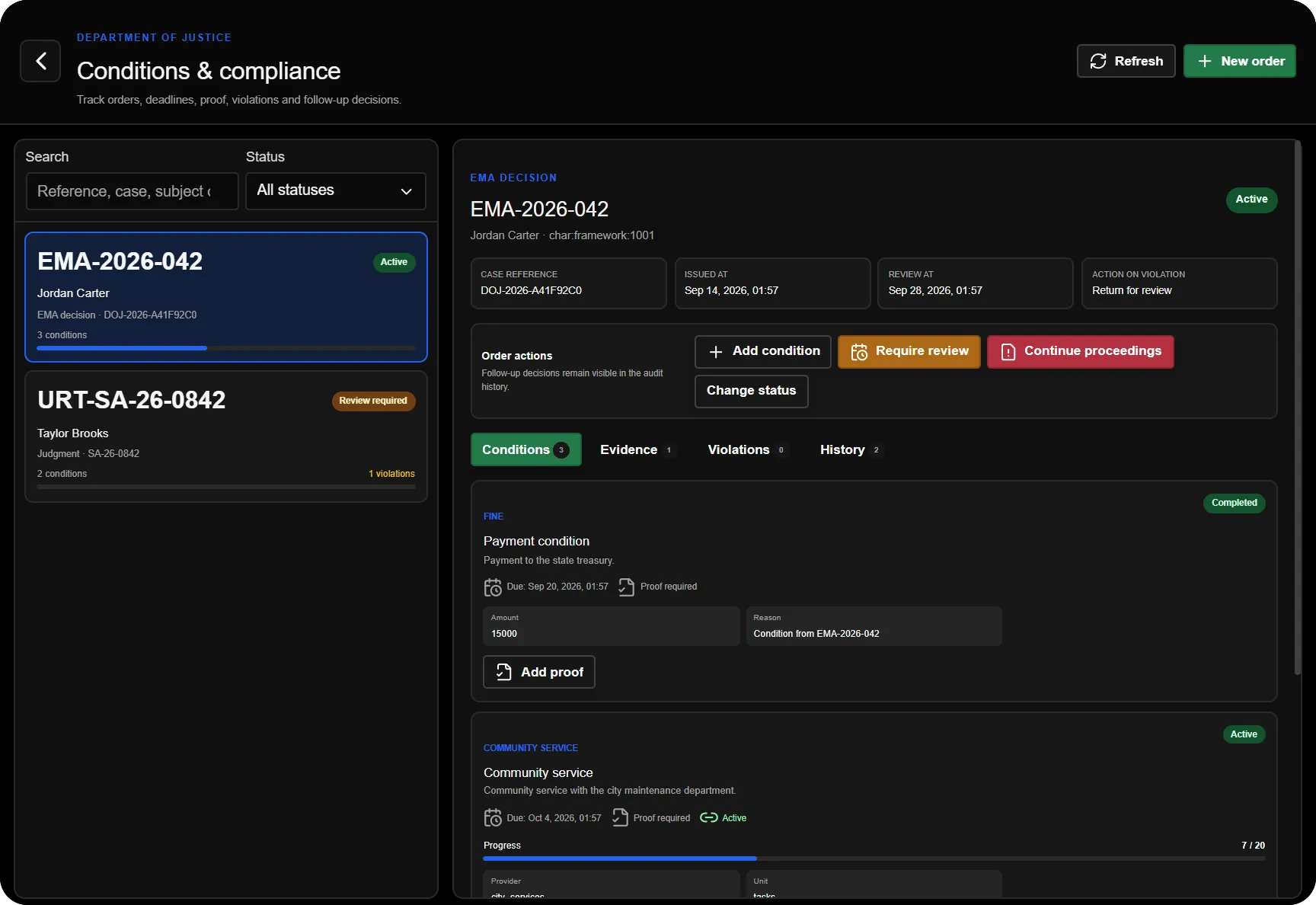
The Conditions app records an order linked to an EMA or judgment reference and a named subject. An order can contain several obligations, each with its own progress, deadline, evidence and violations. Creating a signed document alone does not create or execute a conditions order automatically.
Enable Config.ToggleFeatures.conditions, allow the conditions tablet app and grant Manage conditions to the staff who issue orders or review compliance. The normal DOJ job, app and duty checks apply. Saved Job Configurator settings override the fallback Config.Conditions defaults.
Create and manage an order
- Choose the source type, enter its document reference and optionally the case reference.
- Set the subject's name and identifier, issue date, review date and any explanatory notes. Confirm the identifier against the intended person before executing a provider action.
- Choose whether violations should require review or request continuation of proceedings.
- Add the individual conditions, their details, targets, deadlines and proof requirements. The default limit is 20 conditions per order.
- Create the order. Where a condition supports an integration, use Execute after reviewing its details and prerequisites.
- Follow progress in the conditions list. Use the separate Evidence, Violations and Events tabs to inspect proof decisions, failures and recorded actions.
- Review the outcome and explicitly update the condition or order status where required. An unresolved provider cleanup needs review before the order can be treated as closed.
What each condition does
| Condition | Current execution and completion boundary |
|---|---|
| Fine | Uses immediate bank payment by default and credits the configured recipient job. Config.Conditions.finePaymentMode = "billing" selects external invoicing; invoice submission does not prove payment. |
| Social work | Uses the Police Social Work integration for assignment and authoritative task progress. The provider must be running and configured. |
| Training | Manual obligation with progress, evidence, deadlines and review. It does not automatically enrol someone on a course. |
| Contact ban | Manual obligation and violation tracking. It does not automatically detect every encounter or conversation. |
| Area ban | Uses the Police ankle-monitor/map-zone integration for a configured allowed or excluded area. |
| Licence revocation | Uses the configured framework licence provider for the identified subject. Available licence types depend on that provider. |
| Ankle monitor | Uses the Police monitor integration, including its ownership and lifecycle checks. |
| Regular reporting | Manual reporting obligation with scheduled reporting dates, proof and missed-report handling. |
Police-backed social work, area and monitor actions require sky_policejob by default (Config.Conditions.policeResource). Only one open monitor-backed DOJ condition may own a subject's monitor at a time. Existing unrelated assignments are not overwritten.
The default social-work range is 1–120 tasks. A court condition's service task target is separate from the offence catalogue's community-service hours; check the actual condition you create rather than assuming an automatic conversion.
Proof, deadlines and review
Attach proof with a description and reference, then have an authorised operator accept or reject it. A proof-required condition cannot be completed merely by entering a progress number; accepted evidence is required.
The server checks deadlines and reporting dates periodically; the default interval is 60 seconds. Missed deadlines or reports can create recorded violations and move the order to Review required or Continuation requested, according to the chosen escalation. An order-level review date also brings an active order back for review. This records follow-up work; it does not automatically convene a new hearing or issue a new judgment.
Order statuses are Active, Review required, Continuation requested, Completed and Cancelled. Completed and cancelled orders are terminal in the normal transition model. Condition statuses are tracked independently, so an order's label alone does not establish that every provider action has finished.
Provider failures and recovery
For bank fines, Config.Conditions.billingSocietyJob selects the recipient (default doj). Supported payments enter the DOJ finance journal and recipient payment history. TGG has no supported direct debit/credit path here; use billing mode. Review the Finance provider table before enabling direct payment on your server.
Review the integration status before pressing Execute again. An unavailable provider can cause a preflight failure; an interrupted or ambiguous call can leave Dispatch uncertain. The system can look up exact existing Police social-work, monitor and area assignments to recover their state. It does not blindly repeat a bill submission or licence removal.
Cancellation/completion cleanup removes only provider objects owned by that condition. Failed cleanup remains visible and requires review. An administrative Police cancellation or completion is not automatically treated as normal fulfilment of a court-imposed social-work target.
Keep the original document/reference, condition events and provider evidence together when investigating a discrepancy. See Sharing & Printing for distributing the corresponding document and Server Exports for supported integration contracts.
Optional asset taxes
Asset taxation is a separate feature and is disabled by default. It is not a court fine and does not derive charges from a conditions order. Enable Config.ToggleFeatures.taxes only after verifying the asset, currency, society and billing providers.
The scheduled collector visits currently connected players, reads their owned vehicle and property counts through the configured providers, and calculates:
tax = owned vehicles × vehicleAmount + owned properties × houseAmount
It is not an offline population-wide tax scan.
Config.Taxes setting | Default | Meaning |
|---|---|---|
paymentMode | direct | Direct currency debit, or bills for provider bill submission. |
intervalMinutes | 60 | Interval between collection cycles. |
initialDelaySeconds | 60 | Startup delay before the first scheduled cycle. |
vehicleAmount | 250 | Charge per owned vehicle. |
houseAmount | 500 | Charge per owned property. |
currency | bank | Currency used for direct payment. |
societyJob | doj | Active configured DOJ job receiving revenue. |
notifyPlayer | true | Player notifications for payment outcomes. |
In direct mode, verify both the player's debit and the society credit. In bills mode, the billing provider owns subsequent payment and society revenue. A submitted bill is not proof of payment. A later tax cycle can submit another bill even if the previous provider invoice is unpaid; there is no generic outstanding-invoice check across all billing providers.
The collector persists cycle and entry ledgers. Ambiguous debit, credit or billing operations move into reconciliation instead of being blindly retried. Inspect the entry and the actual provider logs before choosing an outcome. The server-console-only doj_tax_resolve operation records an evidence-based reconciliation decision; it is not a normal player command or an automatic refund tool. Do not edit ledger states just to restart collection.
Operational checks
| Symptom | Check |
|---|---|
| A condition is saved but nothing is enforced | Its type may be manual, or Execute/provider setup is still required. |
| Completion is refused | Required accepted proof, authoritative provider progress and pending cleanup. |
| A fine remains open after bill submission | Confirm actual payment separately. |
| A provider reports Dispatch uncertain | Inspect its existing assignment and recorded condition key before retrying. |
| Taxes never run | Taxes are opt-in; check active settings, schema and asset/payment providers. |
| Tax collection stops for one citizen | Inspect unresolved ledger reconciliation and provider evidence. |