
Browse docs
First Heist
Start with the included Fleeca heist
Fleeca: The Legion Job is included and enabled by default. It supports 1–4 players, has two equipment preparations, and contains two cash carts worth 10,000 each.
Prepare the test as the server owner
Before the player starts, check:
- Their character belongs to the intended Crime organization.
-
hacking_deviceandgas_maskexist in the inventory. Use Inventory Items if they are missing. - The player has space to collect two physical
hacking_deviceitems from the supplied preparation. - The player has space to collect four gas masks and has a wearable bag for the cash carts.
- The organization has a working heist equipment storage point. See Planning and Equipment.
The heist includes an alarm and gas defense. Check that the Fleeca interior on your server matches the supplied door and loot positions. A replacement bank interior may require moving them in the Creator.
This example does not require a minimum number of police officers. If you want that rule, add it to the heist in the Creator; ATM and shop-robbery police settings do not apply here.
Find the preparations and vault settings
Open /heistcreator, select Fleeca: The Legion Job, then choose Operation flow. The in-game Creator shows how the preparations connect to the robbery. Select an image to open it at full size.
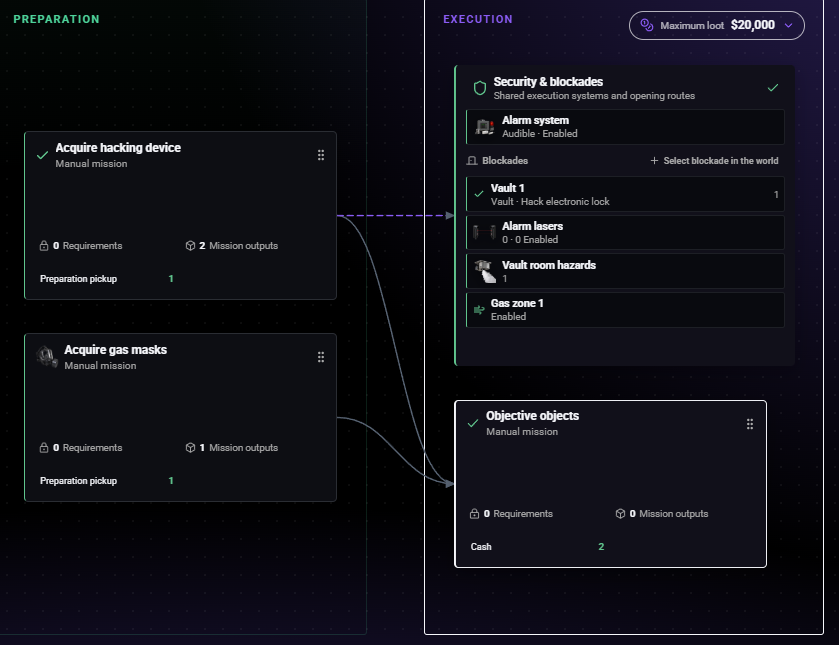
- Acquire hacking device: check how your players obtain the device as well as completing this preparation.
- Acquire gas masks: this pickup supplies four masks.
- Vault 1: select it to inspect the hack, required preparation and equipment.
- Objective objects: this execution mission contains the two cash carts.
To check the mask reward, select Acquire gas masks, then open its entry under Mission outputs in the right-hand panel.
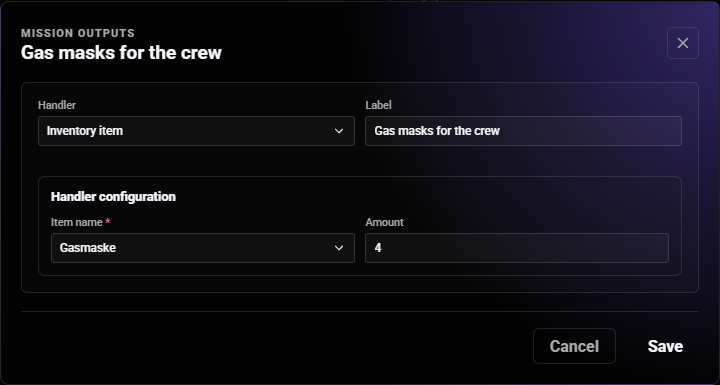
- Inventory item gives the collecting player a physical item.
- The selected mask is the inventory item
gas_mask. Its display name depends on your inventory language. - Amount: 4 matches this heist's equipment requirement, including when one player tests it.
If you only inspect the supplied settings, close the dialog with Cancel. If you change the built-in heist, use Save JSON, restart the resource and create a new plan for your test.
Run the first test as a player
Open Heist Planning
Open Heist Planning in the Crime tablet. You can use it without placing a board first.
For a physical board, use /heistplanning with an organization member who has the default MANAGE_MEMBERS permission. Place it on a nearby flat surface or wall, then interact with it. The command places the board; it does not directly open the planning screen.
Check: the player can see the heist selection in Heist Planning.
Open the plan's map and confirm that the displayed location and mission target lead to the intended Fleeca branch. On a physical organization screen, verify that nearby members see the shared selected plan and presentation state.
Choose the heist and crew
Select Fleeca: The Legion Job and create a plan. Add other members of your organization if needed. One player is enough for this test, and no approach selection or reconnaissance photos are required.
Check: the plan shows Fleeca and the intended crew.
Complete the preparations
Start Acquire hacking device and follow the pickup route. Then start Acquire gas masks and complete its pickup. The mask pickup gives four gas_mask items to the player collecting them.
In the currently supplied Fleeca definition, Acquire hacking device contains both a Planning asset and an Inventory item output with the same hacking_device key. The pickup runtime aggregates both outputs. Completing it therefore gives the collecting player two physical devices, and the plan requires two devices in storage before the finale can start.
Do not add another hacking_device output to the supplied preparation. If you customize it, read Understand pickup outputs before changing either output and create a new plan after saving.
Check: both preparations are complete, and the crew has two real devices and four real masks available to deposit.
Deposit equipment and equip masks
Go to the organization's heist equipment storage interaction, select the plan, and deposit two hacking_device and four gas_mask items. This example requires all four masks even during a solo test. The tablet shows the stock; use the storage interaction for the actual deposit and withdrawal.
Each crew member should equip a mask through the Crew view. Leave the masks in the plan's storage while they are being used. Simply wearing a mask from a clothing shop does not provide this heist's gas protection.
Check: the equipment requirements are complete with two devices and four masks stored, including for a solo run.
Start the heist
Once the preparations and equipment are complete, the leader selects Start heist in the finale.
Now use the equipment storage interaction to withdraw one hacking device for the player opening the vault. Keep both stored until this first start; taking one out earlier makes the equipment checklist incomplete again.
Check: the heist has started, the hacker carries the device, and the masks remain stored.
Open the vault and collect the loot
Go to the bank, use the vault's hacking interaction, and complete the hack while carrying hacking_device. Wear the required bag and collect both cash carts.
Each cart pays the player who collects it. The total is 20,000 when both are collected; the reward is not automatically split among the crew.
Check: both carts are collected and their collectors received 20,000 in total with the supplied settings.
Recover unused equipment
Once everyone has left the gas area, unequip the masks through Crew and recover the remaining stock while the plan is still open. Do this before closing or cancelling the plan.
The plan can remain open after all loot is collected. With the supplied settings, 30 minutes without another heist interaction ends the active run. See Choose sensible time limits before changing this.
Check: nobody still needs gas protection, and the crew has recovered the equipment it wants to keep before closing the plan.
If something does not work
| Problem | What to check |
|---|---|
| Fleeca is missing | Check for an existing open Fleeca plan in this organization and any startup errors |
| Finale says equipment is missing | With the current supplied definition, deposit two devices and all four masks before starting |
| There is no deposit button in the tablet | Use the organization's physical heist storage interaction and select this plan |
| Hack says the laptop is missing | The player performing it must carry hacking_device |
| Cash cannot be collected | Equip a bag and check whether another player is using that cart |
| Door or carts are misplaced | Adjust them for your installed interior in the Creator |
| Your edit has no effect | Apply the save correctly and create a fresh plan |
The supplied file is config/heists/fleeca_legion_square_v1.json, listed in Config.HeistDefinitionFiles. Editing this built-in through Save JSON requires a resource restart before new plans use the changes.