
Browse docs
Custom Quests
The Battle Pass V3 allows you to define your own quests and track player progress through them. This guide will walk you through creating a custom quest using the configurator and updating quest progress in your script.
Create Your Custom Quest
First open the Configurator and create a new quest under the custom sort.
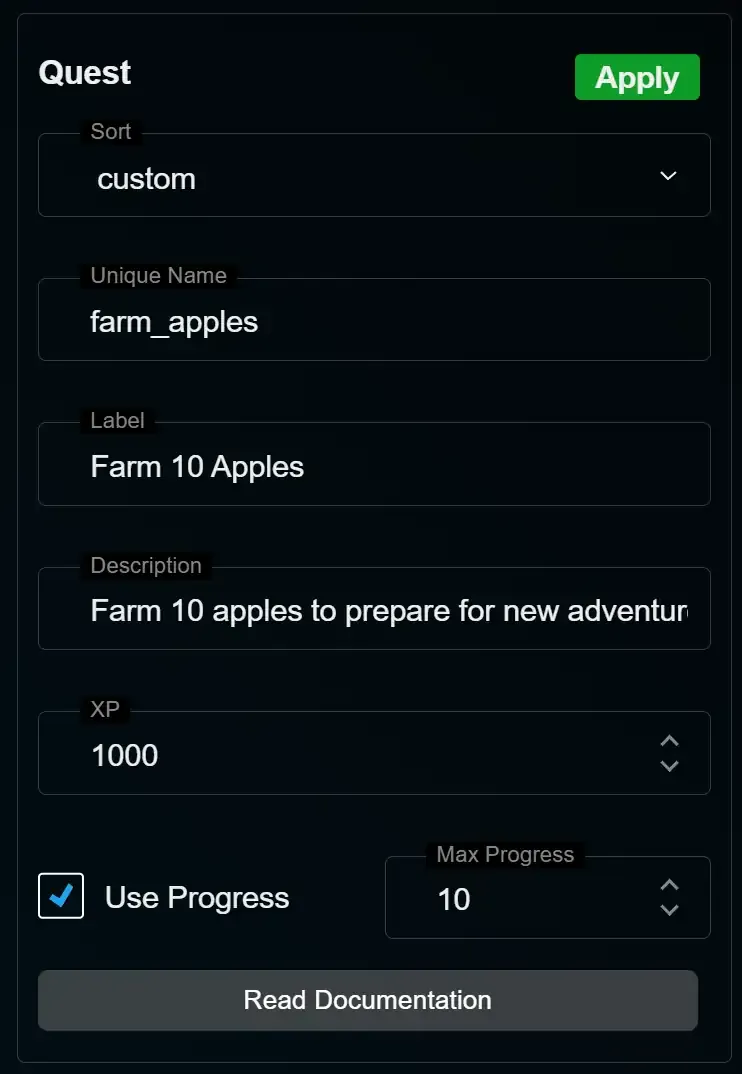
- In the configurator, choose a unique internal name for your quest (in this case,
farm_apples). - Set a label that will appear in the UI (Farm 10 Apples), and write a brief description to explain the goal.
- If your quest has progress then enable progress tracking by checking the Use Progress option and set the Max Progress. In this example the player needs to complete the action (farming apples) 10 times to finish the quest
- You can also set how much XP the player receives upon completion—in this example, 1000 XP.
- Save your changes with Apply.
Add Progress Tracking in Your Script
Add the export to your existing server-side collection flow, after that flow has validated the action and successfully given the item. src must be the collecting player's server ID:
server.lua
exports.sky_battlepass:AddPlayerQuestProgress(src, "farm_apples", 1)
For a quest without progress tracking, pass
100 as the amount to complete it.Support
Need help? Our support team is always ready to assist
Join Discord