
Browse docs
Police Tablet and Casework
One operational MDT
The Police Tablet combines daily patrol tools and long-term investigative records. Apps are filtered by the officer's active job, duty state, resource configuration, and Boss Menu tablet restrictions.
| App area | Purpose |
|---|---|
| Citizens and vehicles | Registered owner, profile, fingerprint, DNA, vehicle, and plate information |
| Cases and reports | Structured investigations, involved people, linked records, notes, and evidence |
| Offences | Configurable law and fine catalogue with stable IDs for reports and billing |
| Warrants and BOLOs | Active wanted-person, vehicle, and alert workflows |
| Forms and gallery | Shared documents, camera uploads, CCTV, bodycam, and report media |
| Prison and social work | Sentence creation and active sentence monitoring |
| Boss Menu | Roles, permissions, members, money, and tablet-app access |
Offence catalogue
The offence catalogue stores categories and offences with stable IDs. Reports and integrations can reference those IDs instead of duplicating offence names or fine values. Advanced Speed Camera uses the same catalogue to match an offence from the measured speed overage.
Access and configuration
Config.PoliceTablet controls app availability and database autofill behavior. Bosses can restrict
individual tablet apps per grade without granting a role access to every police record.
Citizens and vehicles can be populated from the framework database or maintained through the public manual registry exports when autofill is disabled.
File Explorer, printing and sharing
The File Explorer app opens citizen and vehicle records, cases, reports, warrants and BOLOs alongside incoming Shared Documents. Browse folders with a double-click, move through the breadcrumb path and search nested folders and document categories.
Use Print on a saved record to select a configured job printer. Use Share to select recipient jobs, reopen the dialog to edit recipients, or revoke access. Receiving jobs read the released document; the originating department keeps editing and onward-sharing control. These document-level grants replace the old broad Share → Records rules. Course and qualification sharing remains separate.
A released record with a primary person or vehicle link appears in that DOJ record's Shared Documents folder, grouped by its originating department. Unassigned documents use DOJ's sidebar Shared Documents area. Other job explorers keep received documents in their normal department-based Shared Documents area.
Police reports and cases detect conflicting saved revisions and preserve the local draft for review. Saving report content does not change its recipient list. See the File Explorer and Shared Documents guide for access, printing and update requirements.
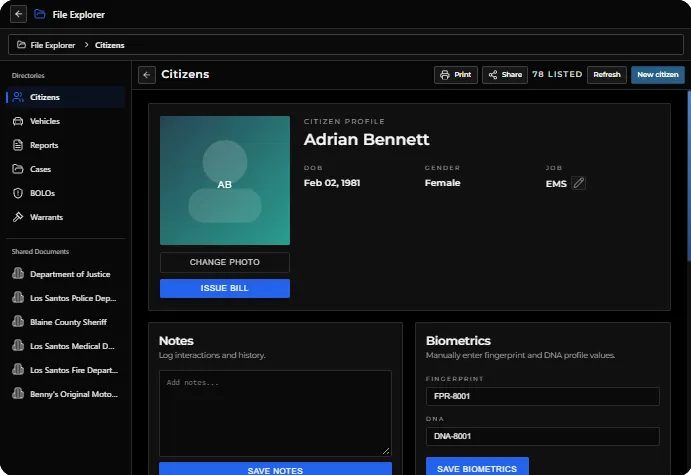
Stable registry identities and custody status
Vehicle registry entries use a stable internal identity. Changing a vehicle plate no longer creates a second shared record or disconnects existing links from the original registry entry.
Citizen records also show the current custody state when a person is imprisoned or marked as broken out. The status includes the booking time and, where available, the remaining sentence duration so officers do not have to infer an active sentence from older reports.