
Browse docs
Configuration and Settings
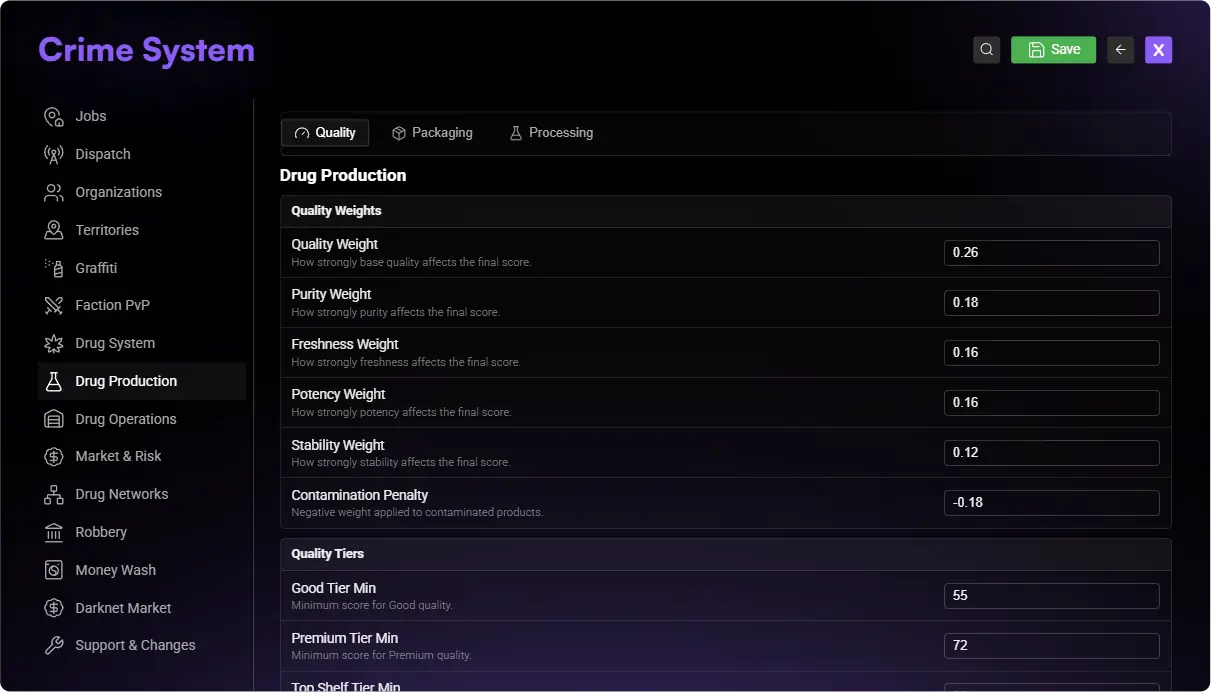
The visible editor identifies the runtime owner of most server-wide Drug System settings. Creator entries and persisted gameplay state remain separate layers.
Choose the correct editor
| Change | Owner | Example |
|---|---|---|
| One catalog entry or world location | /drugcreator | Recipe inputs, supplier price, field position, lab purchase price |
| System-wide behavior exposed by Crime System | /jobconfig → Crime System | Access, quality weights, plant defaults, risk, market, performance |
| Startup or advanced value not exposed in either editor | config/drugs*.lua | Visual presets or a specialist runtime default |
| Player-owned or running state | The gameplay UI and database | Owned lab, installed equipment, active order, plant progress |
Drug Creator: Simple and Advanced
The Creator detail level switch applies to all 18 entry types.
- Simple shows essential fields and supplies recommended hidden defaults for new equipment, workers, processes, and strains.
- Advanced shows every available setting and remains the compatibility default.
- Switching modes does not erase saved advanced values.
- If validation finds a problem in a hidden setting, the Creator switches to Advanced and opens that field.
Use Simple for a normal first setup. Use Advanced when changing IDs, process steps, stock modes, limits, risks, ownership rules, or other specialist behavior.
See Creator and Catalog for all supported sections.
Job Configurator map
Open /jobconfig → Crime System. The Drug System settings are organized as follows:
| Main area | Groups | What to verify after a change |
|---|---|---|
| Drug System | General, Runtime Access, Performance | Creator availability, commands/access, snapshot and tick behavior |
| Drug Production | Quality, Packaging, Processing | Quality result, package rules, timing and process behavior |
| Drug Operations | Growing, Cultivation Levels, Labs & Camper, Power & Equipment, Workers | Harvest, unlocks, lifecycle, capacity, power, upkeep and wages |
| Market & Risk | Market & Distribution, Raids & Sabotage, Consumption | Prices/payouts, threats, cooldowns, tolerance and effects |
| Faction PvP | Laboratory Takeovers | Eligibility, defenders, capture and recovery |
| Drug Networks | Dynamic Market, Heat & Risk, Contact Network, Business Network | Market movement, heat, contact access and business operations |
Some groups contain additional subsections such as runtime dispatch and police, payouts, access and ownership, quality weights and tiers, plant defaults, harvest windows, lab rent and lifecycle, camper settings, generators, prices, threat chances, and tolerance decay.
Lua configuration files
These files are loaded in this order. Later modules may depend on values created by earlier ones.
| File | Main responsibility |
|---|---|
config/drugs.lua | Core Drug System defaults and general behavior |
config/drugs_growing.lua | Plants, fields, growth and cultivation |
config/drugs_labs_power_workers.lua | Lab power, equipment and workers |
config/drugs_laboratories.lua | Laboratory lifecycle, interiors, storage and supplier base catalog |
config/drugs_campers.lua | Camper and mobile-lab behavior |
config/drugs_market_threat_processing.lua | Market, threats, raids and processing defaults |
config/drugs_visuals.lua | Consumption and visual-effect presets |
config/drugs_supply_chain.lua | Effective starter products, supplier additions and supply-chain version |
config/drugs_business_network.lua | Business and network behavior |
Restart Crime System during maintenance after editing a Lua file so the loaded defaults change. A restart alone does not overwrite saved Creator entries or Job Configurator values.
Priority and persistence
| Situation | Effective value |
|---|---|
| A Job Configurator value has been saved | Saved Job Configurator value |
| No Job Configurator value exists | Registered/Lua default |
| A Creator entry exists in the database | Saved Creator entry |
| A new starter entry is imported | Current shipped starter value, then future supported merges preserve customization |
| A player owns a lab or has a running operation | Persisted ownership/operation data, which may keep creation-time values |
When testing a change, use a new activity where possible. Existing orders, plants, purchased facilities, or market states can retain their current state until their normal lifecycle completes.
Safe change workflow
Identify the owner
Record the current value and use the first table to choose Drug Creator, Job Configurator, Lua, or persisted gameplay state.
Change one behavior
Edit one related group at a time in the owning interface.
Verify the saved value
Save, close, and reopen the editor. Confirm the value before starting gameplay.
Test as a normal player
Start a fresh activity and verify inventory, money, permissions, position, output, cooldown, and error behavior.
Verify persistence
Restart during maintenance when the change involves Lua or persistence. Confirm the setting and player state again afterward.
Common reasons a change appears ineffective
A saved Job Configurator or Creator value may take priority. Confirm the owner, then restart the resource during maintenance if the changed value is file-owned.
Reopen its single Assigned recipe, confirm recipeId, and save the processing location itself.
Check the saved dock_supplier entry, not only the Lua starter price.
Check the exact item ID, required amount, inventory registration, and whether the flow reads player inventory or lab storage.
Check ingredients, tools, installed machines, worker availability, treasury funds, power, space, and maintenance.
Switch to Advanced. Existing stored values remain intact.
Retest permissions, ownership, faction or job state, police requirement, distance, and inventory as a normal player.
For the shipped IDs and numeric defaults, use Default Data and Items. To build connected Creator entries in a safe order, follow Creator Workflows. General import behavior is covered in Configuration.